SGPawn Events: The Puppeteer (Controller) / Puppet (Pawn) Architecture
The SGPawn (SenseGlove Pawn) is intentionally designed as a data/event-driven puppet. It detects touch, grab candidates, and hand state, but it does not make gameplay decisions on its own. Instead, it delegates the decisions via firing events
Usually these decisions are delegated to the SGPlayerController (or your own controller if you want to customize the behaviors), which acts as the puppeteer for SGPawn (the puppet):
- It registers to
SGPawnevents at theBeginPlayevent. - It listens to
SGPawnevents. - It decides when to grab or release when certain conditions are met.
- It applies gameplay logic.
- It drives haptics or other responses.
That's how SGPlayerController works under the hood.
This separation ensures:
- Clean architecture.
- Full and exnsible customization.
- No hidden behavior inside
SGPawn. - Deterministic control over interaction rules.
Architecture Overview
SGPawn ---> Emits State Events ---> SGPlayerController decides what to do
SGPawn:
- Tracks touch state.
- Tracks grab candidates.
- Tracks grabbed actors.
- Emits events.
SGPlayerController:
- Subscribes to events.
- Calls
Grab()/Release(). - Applies custom interaction logic.
- Updates haptics.
Exposed Events
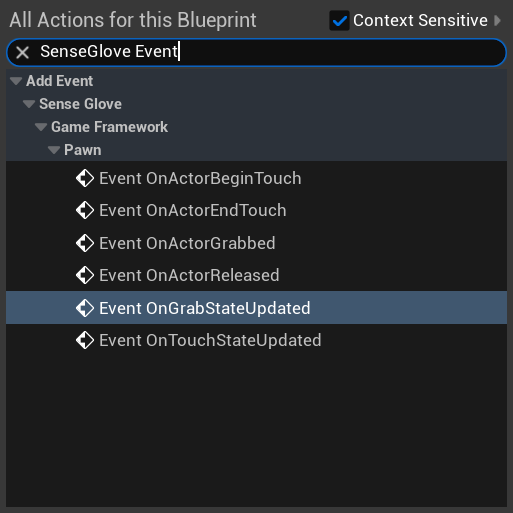
SGPawn provides the following event exposed to both C++ and Blueprint:
OnGrabStateUpdatedOnTouchStateUpdatedOnActorGrabbedOnActorReleasedOnActorBeginTouchOnActorEndTouch
Important
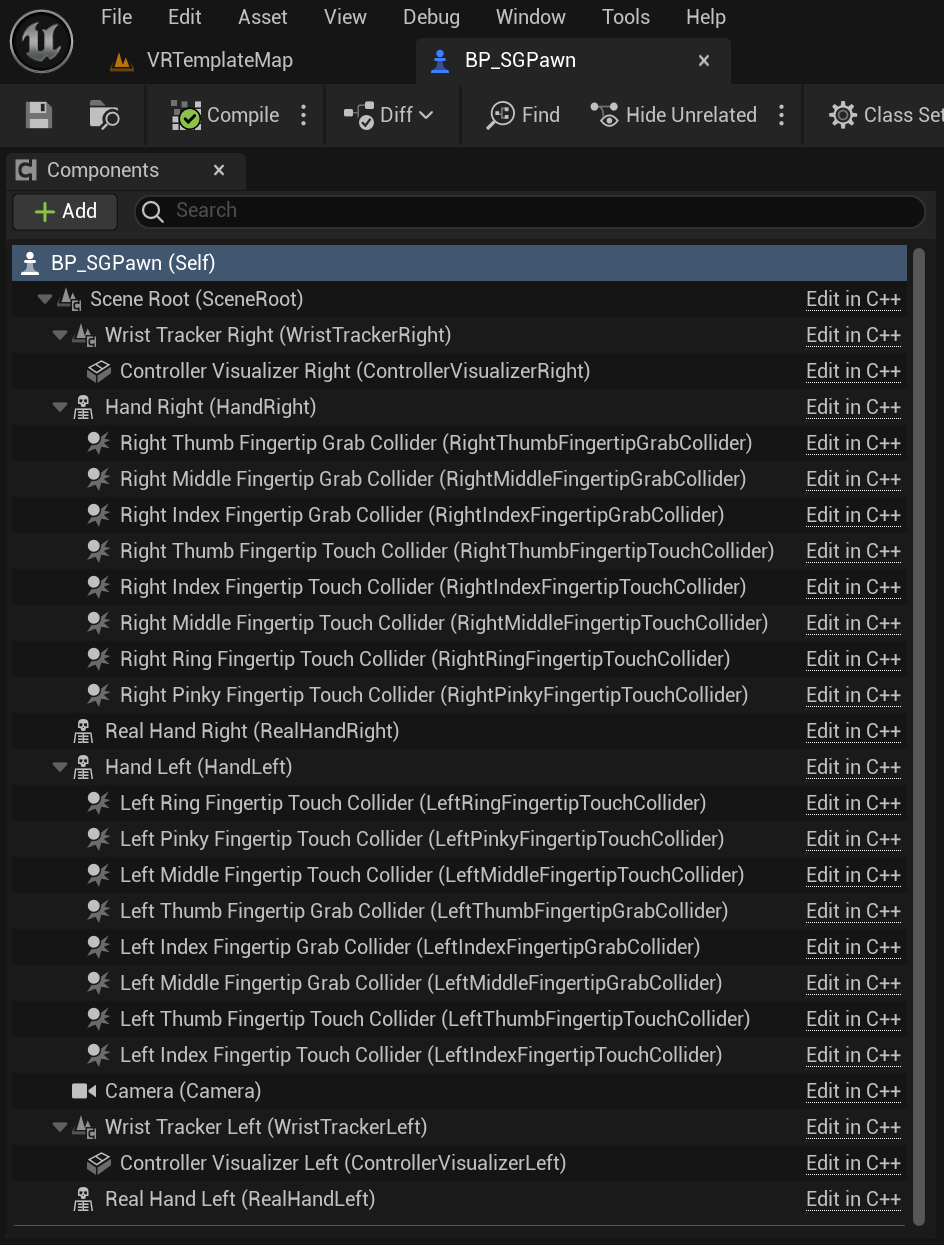
The current implementation of
SGPawnrelies on3grab colliders and5touch colliders for grab and touch detection.
On Grab State Updated Event
This is the main decision event for grabbing logic. The Pawn informs you:
"Here is the current grab state. You decide what to do."
It is defined in C++ like this:
DECLARE_EVENT_OneParam(ASGPawn, FGrabStateUpdatedEvent, const FSGGrabState& GrabState);
In Blueprint, the event appears as shown below:
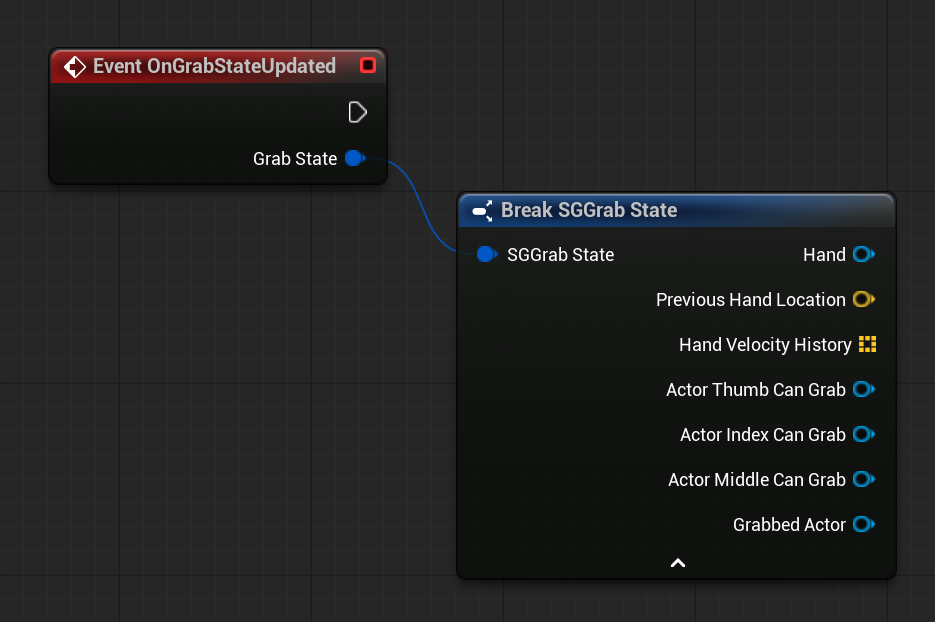
This event is triggered only when the hand is visible and when any finger on the left or right hand, equipped with a grab collider, begins overlapping (colliding with) or ends overlapping (stops colliding with) an actor that owns an SGGrabComponent. So in summary it fires when the following conditions are met:
- The hand is visible.
- Any finger (left or right hand) equipped with a grab collider:
- Begins overlapping (starts colliding with), or
- Ends overlapping (stops colliding with).
- The overlapped actor owns an
SGGrabComponent.
Subscribers to this event receive a snapshot of the FSGGrabState struct. At the moment the event is fired, the struct contains the following data:
Hand: TheSGVirtualHandComponentwhose grab state was updated due to a finger beginning or ending an overlap with another actor.PreviousHandLocation:SGPawncontinuously records hand movement every engine tick. This field stores the hand’s location from the previous tick. It can be used to calculate object velocity or apply impulse forces when an object is thrown.HandVelocityHistory: A history of previous hand locations, up toSGPawn::MaxNumberOfHandVelocitySamples.MaxNumberOfHandVelocitySamplesis aUPROPERTYinSGPawnthat defaults to10but can be adjusted as needed.ActorThumbCanGrab: The actor currently overlapping with the thumb’s grab collider. Ifnull, the thumb is not overlapping any grabbable actor (which means the actor has anSGGrabComponent).ActorIndexCanGrab: The actor currently overlapping with the index finger’s grab collider. Ifnull, the index finger is not overlapping any grabbable actor.ActorMiddleCanGrab: The actor currently overlapping with the middle finger’s grab collider. Ifnull, the middle finger is not overlapping any grabbable actor.GrabbedActor: The actor currently being grabbed by this hand. Ifnull, the hand is not grabbing anything at that moment.
Here is how the current SGPlayerController performs grab detection and instructs the SGPawn it controls to execute grab and release actions:
void ASGPlayerController::BeginPlay()
{
    Super::BeginPlay();

    ASGPawn* SGPawn{Cast<ASGPawn>(GetPawn())};
    if (!ensureAlwaysMsgf(IsValid(SGPawn), TEXT("%s"), TEXT("ERROR: invalid SenseGlove pawn!")))
    {
        return;
    }

    SGPawn->OnGrabStateUpdated().AddWeakLambda(
        this, [= SG_CAPTURE_THIS](const FSGGrabState& GrabState) -> void
        {
            if (!IsValid(SGPawn))
            {
                return;
            }

            if (!IsValid(GrabState.Hand))
            {
                return;
            }

            const bool bHandVisible = GrabState.Hand->IsVisible();
            if (!bHandVisible)
            {
                if (SGPawn->IsGrabbing(GrabState.Hand))
                {
                    SGPawn->Release(GrabState.Hand);
                }
                return;
            }

            if (SGPawn->IsGrabbing(GrabState.Hand))
            {
                if (!IsValid(GrabState.ActorThumbCanGrab) ||
                    (GrabState.ActorIndexCanGrab != GrabState.ActorThumbCanGrab
                        && GrabState.ActorMiddleCanGrab != GrabState.ActorThumbCanGrab))
                {
                    SGPawn->Release(GrabState.Hand);
                }
            }
            else
            {
                if (SGPawn->CanGrab(GrabState.Hand, GrabState.ActorThumbCanGrab))
                {
                    SGPawn->Grab(GrabState.Hand, GrabState.ActorThumbCanGrab);
                }
            }
        });
}
In this implementation, the SGPlayerController listens for grab state updates and determines whether the hand should grab or release an actor based on visibility and finger overlap conditions.
Tip
Haptic feedback is also handled and enforced through
SGPlayerController. You can review the full implementation in the plguin source code forSGPlayerController.In general, with the current version of the plugin, you can integrate haptic feedback into your own hand interaction system in several ways:
- The
SGHapticsComponenthigh-level approach.- The SenseGlove C++ API:
- Via the SGHandLayer API.
- Via the SGHpaticGlove API.
- The SenseGlove Blueprint API:
- Via the SGHandLayer API which provides a higher-level abstraction compared to the
SGHapticGloveAPI.- Via the SGHapticGlove API, which offers a lower-level interface than the
SGHandLayerAPI and requires some boilerplate code to safely obtain an instance of the desired glove (see Safe and Reliable Glove Access in Blueprint).- Additionally, there is the
SGTouchComponent, which provides simplified and limited functionality. On its own, it cannot trigger haptics. It is designed to work in conjunction with the stockSGPlayerControllershipped with the SenseGlove Unreal Engine plugin.
Touch State Updated Event
This is the main decision event for controlling the touch logic. The Pawn informs you:
"Here is the current touch state. You decide what to do."
It is defined in C++ like this:
DECLARE_EVENT_OneParam(ASGPawn, FTouchStateUpdatedEvent, const FSGTouchState& TouchState);
In Blueprint, the event appears as shown below:
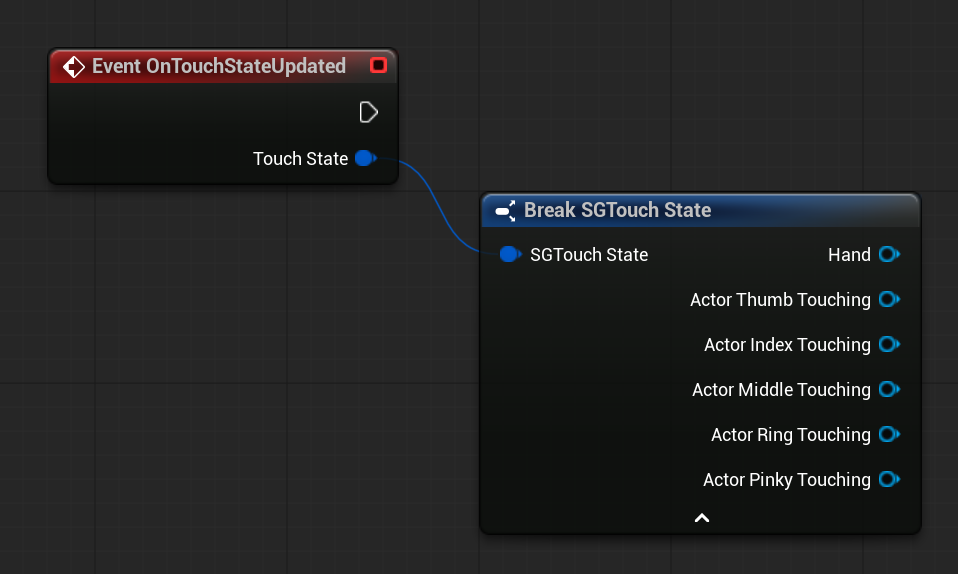
This event is triggered only when the hand is visible and when any finger on the left or right hand, equipped with a grab collider, begins overlapping (colliding with) or ends overlapping (stops colliding with) an actor that owns an SGGrabComponent. So in summary it fires when the following conditions are met:
- The hand is visible.
- Any finger (left or right hand) equipped with a touch collider:
- Begins overlapping (starts colliding with), or
- Ends overlapping (stops colliding with).
- The overlapped actor owns an
SGTouchComponent.
Subscribers to this event receive a snapshot of the FSGTouchState struct. At the moment the event is fired, the struct contains the following data:
Hand: TheSGVirtualHandComponentwhose touch state was updated due to a finger beginning or ending an overlap with another actor.ActorThumbTouching: The actor currently overlapping with the thumb’s touch collider. Ifnull, the thumb is not overlapping any touchable actor (which means the actor has anSGTouchComponent).ActorIndexTouching: The actor currently overlapping with the index’s touch collider. Ifnull, the index is not overlapping any touchable actor.ActorMiddleTouching: The actor currently overlapping with the middle’s touch collider. Ifnull, the middle is not overlapping any touchable actor.ActorRingTouching: The actor currently overlapping with the ring’s touch collider. Ifnull, the ring is not overlapping any touchable actor.ActorPinkyTouching: The actor currently overlapping with the pinky’s touch collider. Ifnull, the pinky is not overlapping any touchable actor.
Here is how the current SGPlayerController performs touch detection and instructs the SGPawn it controls to apply haptics feedback:
void ASGPlayerController::BeginPlay()
{
    Super::BeginPlay();

    ASGPawn* SGPawn{Cast<ASGPawn>(GetPawn())};
    if (!ensureAlwaysMsgf(IsValid(SGPawn), TEXT("%s"), TEXT("ERROR: invalid SenseGlove pawn!")))
    {
        return;
    }

    SGPawn->OnTouchStateUpdated().AddWeakLambda(
        this, [= SG_CAPTURE_THIS](const FSGTouchState& TouchState) -> void
        {
            if (!IsValid(SGPawn))
            {
                return;
            }

            if (!IsValid(TouchState.Hand))
            {
                return;
            }

            const bool bHandVisible = TouchState.Hand->IsVisible();
            if (!bHandVisible)
            {
                return;
            }

            const bool bGloveConnected = TouchState.Hand->IsGloveConnected();
            if (!bGloveConnected)
            {
                return;
            }

            Pimpl->UpdateHapticsFeedback(TouchState);
        });
}
In this implementation, the SGPlayerController listens for touch state updates and determines whether the haptic feedbacks should be applied to the glove on that hand, or not. This decision is determined based on various conditions such as hand visibility and finger overlap conditions. Since each fingers haptic feedback application and the type of haptic feedback is decided individually, for the sake of readability the logic has been offloaded to an SGPlayerController's internal function Pimpl->UpdateHapticsFeedback(). For example, it applies vibrotactile feedback to eligible fingers like this:
In this implementation, the SGPlayerController listens for touch state updates and determines whether haptic feedback should be applied to the glove on that hand. This decision is based on several conditions, such as hand visibility and finger overlap states. Since each finger’s haptic feedback and feedback type are evaluated individually, the detailed logic has been offloaded to the internal SGPlayerController function Pimpl->UpdateHapticsFeedback() for readability and separation of concerns.
For example, vibrotactile feedback is applied to eligible fingers as follows:
void ASGPlayerController::FImpl::UpdateHapticsFeedback(const FSGTouchState& TouchState)
{
    if (!IsValid(TouchState.Hand))
    {
        return;
    }

    USGHapticGlove* Glove{TouchState.Hand->GetConnectedGlove()};
    if (!IsValid(Glove))
    {
        return;
    }

    const bool bGloveConnected = Glove->IsConnected();
    if (!bGloveConnected)
    {
        return;
    }

    // some omitted code due to irrelevance
    ....

    // Send Vibrotactile to the thumb finger if it's touching an actor...
    if (IsValid(TouchState.ActorThumbTouching))
    {
        USGCustomWaveform* CustomWaveform(GetCustomWaveform(TouchState.ActorThumbTouching));
        Glove->SendCustomWaveform(CustomWaveform, ESGHapticLocation::ThumbTip);
    }

    // Send Vibrotactile to the index finger if it's touching an actor...
    if (IsValid(TouchState.ActorIndexTouching))
    {
        USGCustomWaveform* CustomWaveform(GetCustomWaveform(TouchState.ActorIndexTouching));
        Glove->SendCustomWaveform(CustomWaveform, ESGHapticLocation::IndexTip);
    }

    // Send Vibrotactile to the middle finger if it's touching an actor...
    if (IsValid(TouchState.ActorMiddleTouching))
    {
        USGCustomWaveform* CustomWaveform(GetCustomWaveform(TouchState.ActorMiddleTouching));
        Glove->SendCustomWaveform(CustomWaveform, ESGHapticLocation::MiddleTip);
    }

    // Send Vibrotactile to the ring finger if it's touching an actor...
    if (IsValid(TouchState.ActorRingTouching))
    {
        USGCustomWaveform* CustomWaveform(GetCustomWaveform(TouchState.ActorRingTouching));
        Glove->SendCustomWaveform(CustomWaveform, ESGHapticLocation::RingTip);
    }

    // Send Vibrotactile to the pinky finger if it's touching an actor...
    if (IsValid(TouchState.ActorPinkyTouching))
    {
        USGCustomWaveform* CustomWaveform(GetCustomWaveform(TouchState.ActorPinkyTouching));
        Glove->SendCustomWaveform(CustomWaveform, ESGHapticLocation::PinkyTip);
    }
}
As can be seen from the above code, the SGCustomWaveform is constructed via a separate helper function:
USGCustomWaveform* ASGPlayerController::FImpl::GetCustomWaveform(const AActor* Actor)
{
    float Amplitude = 0.0f;
    float Duration = 0.0f;
    float Frequency = 0.0f;

    if (IsValid(Actor))
    {
        const USGTouchComponent* TouchComponent{USGTouchComponent::GetTouchComponent(Actor)};
        if (IsValid(TouchComponent))
        {
            Amplitude = TouchComponent->GetVibrotactileAmplitude();
            Duration = TouchComponent->GetVibrotactileDuration();
            Frequency = TouchComponent->GetVibrotactileFrequency();
        }
    }

    USGCustomWaveform* CustomWaveform{
        USGCustomWaveform::NewCustomWaveform(Owner, Amplitude, Duration, Frequency)
    };
    return CustomWaveform;
}
When it comes to force-feedback, the controller sends force-feedback to all fingers at once, while still constructing the force-feedback levels array via a separate function. 5 elements for 5 fingers indexed from thumb to pinky, where element 0 corresponds to the thumb, 1 to the index finger, and so on, with 4 representing the pinky; see the SGTouchComponent documentation for more details. This is how UpdateHapticsFeedback() sends force-feedback to the glove:
void ASGPlayerController::FImpl::UpdateHapticsFeedback(const FSGTouchState& TouchState)
{
    if (!IsValid(TouchState.Hand))
    {
        return;
    }

    USGHapticGlove* Glove{TouchState.Hand->GetConnectedGlove()};
    if (!IsValid(Glove))
    {
        return;
    }

    const bool bGloveConnected = Glove->IsConnected();
    if (!bGloveConnected)
    {
        return;
    }

    // Queue the Force-Feedback command...
    TArray<float> ForceFeedbackLevels{
        GetForceFeedbackLevels(
            TouchState.ActorThumbTouching, TouchState.ActorIndexTouching, TouchState.ActorMiddleTouching,
            TouchState.ActorRingTouching, TouchState.ActorPinkyTouching)
    };
    Glove->QueueForceFeedbackLevels(MoveTemp(ForceFeedbackLevels));

    // Send the haptics commands!
    Glove->SendHaptics();
}
Here is the current implementation for GetForceFeedbackLevels():
TArray<float> ASGPlayerController::FImpl::GetForceFeedbackLevels(
    const AActor* ActorThumbTouching,
    const AActor* ActorIndexTouching,
    const AActor* ActorMiddleTouching,
    const AActor* ActorRingTouching,
    const AActor* ActorPinkyTouching)
{
    const float ThumbForceFeedbackLevel = GetForceFeedbackLevel(ActorThumbTouching);
    const float IndexForceFeedbackLevel = GetForceFeedbackLevel(ActorIndexTouching);
    const float MiddleForceFeedbackLevel = GetForceFeedbackLevel(ActorMiddleTouching);
    const float RingForceFeedbackLevel = GetForceFeedbackLevel(ActorRingTouching);
    const float PinkyForceFeedbackLevel = GetForceFeedbackLevel(ActorPinkyTouching);

    const TArray<float> ForceFeedbackLevels{
        ThumbForceFeedbackLevel,
        IndexForceFeedbackLevel,
        MiddleForceFeedbackLevel,
        RingForceFeedbackLevel,
        PinkyForceFeedbackLevel,
    };

    return ForceFeedbackLevels;
}
Tip
You can review the full implementation in the plguin source code for
SGPlayerController.In general, with the current version of the plugin, you can integrate haptic feedback into your own hand interaction system in several ways:
- The
SGHapticsComponenthigh-level approach.- The SenseGlove C++ API:
- Via the SGHandLayer API.
- Via the SGHpaticGlove API.
- The SenseGlove Blueprint API: SGHandLayer API which provides a higher-level abstraction compared to the
SGHapticGloveAPI.
- Via the SGHapticGlove API, which offers a lower-level interface than the
SGHandLayerAPI and requires some boilerplate code to safely obtain an instance of the desired glove (see Safe and Reliable Glove Access in Blueprint).- Additionally, there is the
SGTouchComponent, which provides simplified and limited functionality. On its own, it cannot trigger haptics. It is designed to work in conjunction with the stockSGPlayerControllershipped with the SenseGlove Unreal Engine plugin.
Actor Grabbed Event
This event is triggered whenever a grab is successfully performed by either the left or right hand. Subscribers to this event are notified about which hand performed the grab and which grabbable actor (an actor that owns an SGGrabComponent) was grabbed.
It is defined in C++ like this:
DECLARE_EVENT_TwoParams(ASGPawn, FActorGrabbedEvent,
    const USGVirtualHandComponent* Hand,
    const AActor* Actor);
In Blueprint, the event appears as shown below:
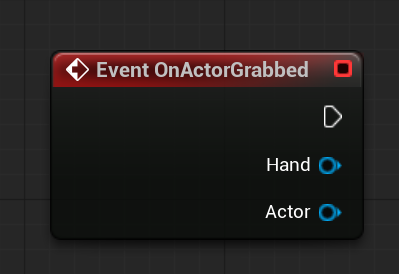
Actor Released Event
This event is triggered whenever a release is successfully performed by either the left or right hand. Subscribers to this event are notified about which hand performed the release and which grabbable actor (an actor that owns an SGGrabComponent) was released.
It is defined in C++ like this:
DECLARE_EVENT_TwoParams(ASGPawn, FActorReleasedEvent,
    const USGVirtualHandComponent* Hand,
    const AActor* Actor);
In Blueprint, the event appears as shown below:
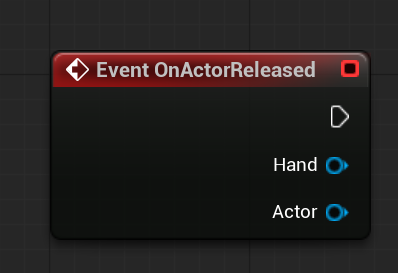
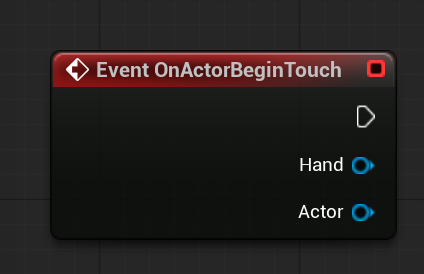
Actor Begin Touch Event
This event is triggered whenever any finger on the left or right hand comes into contact with another actor. Subscribers to this event are notified about which hand initiated the overlap and which touchable actor (an actor that owns an SGTouchComponent) was touched.
It is defined in C++ like this:
DECLARE_EVENT_TwoParams(ASGPawn, FActorBeginTouchEvent,
    const USGVirtualHandComponent* Hand,
    const AActor* Actor);
In Blueprint, the event appears as shown below:
Actor End Touch Event
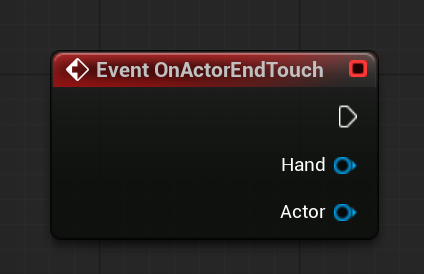
This event is triggered whenever any finger on the left or right hand ends contact with another actor that was previously touched by that finger. Subscribers to this event are notified about which hand's finger ended the overlap and which touchable actor (an actor that owns an SGTouchComponent) is no longer being touched by that finger.
It is defined in C++ like this:
DECLARE_EVENT_TwoParams(ASGPawn, FActorEndTouchEvent,
    const USGVirtualHandComponent* Hand,
    const AActor* Actor);
In Blueprint, the event appears as shown below:
SGPawn Grab/Realase-Related Functions
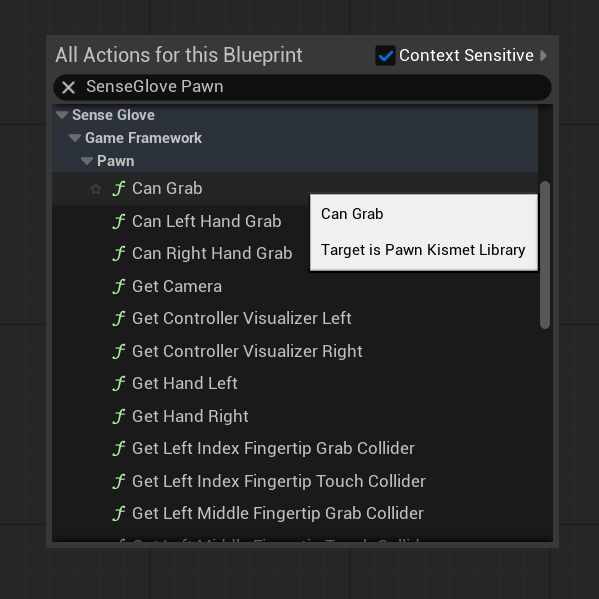
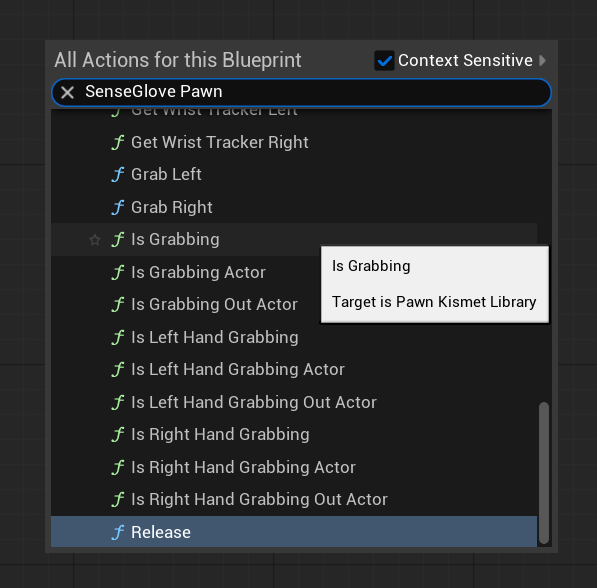
In addition to the events described above, SGPawn provides a set of helper functions related to grabbing and releasing actors.
These functions allow you to:
- Check whether a specific hand can grab a given actor.
- Determine whether a hand is currently grabbing an actor.
- Retrieve the currently grabbed actor via an output parameter.
- Trigger grab and release actions programmatically for either hand.
These helper functions are exposed to both C++ and Blueprint:
public:
    FORCEINLINE bool CanLeftHandGrab(const AActor* Actor) const
    {
        return !IsLeftHandGrabbing() && ((IsValid(Actor) && Actor == LeftHandGrabState.ActorThumbCanGrab)
            && (Actor == LeftHandGrabState.ActorIndexCanGrab || Actor == LeftHandGrabState.ActorMiddleCanGrab));
    }

    FORCEINLINE bool IsLeftHandGrabbing(const AActor* Actor) const
    {
        return IsValid(Actor) && LeftHandGrabState.GrabbedActor == Actor;
    }

    bool IsLeftHandGrabbing(AActor*& OutActor) const;

    FORCEINLINE bool IsLeftHandGrabbing() const
    {
        return IsValid(LeftHandGrabState.GrabbedActor);
    }

    FORCEINLINE bool CanRightHandGrab(const AActor* Actor) const
    {
        return !IsRightHandGrabbing() && ((IsValid(Actor) && Actor == RightHandGrabState.ActorThumbCanGrab)
            && (Actor == RightHandGrabState.ActorIndexCanGrab || Actor == RightHandGrabState.ActorMiddleCanGrab));
    }

    FORCEINLINE bool IsRightHandGrabbing(const AActor* Actor) const
    {
        return IsValid(Actor) && RightHandGrabState.GrabbedActor == Actor;
    }

    FORCEINLINE bool IsRightHandGrabbing() const
    {
        return IsValid(RightHandGrabState.GrabbedActor);
    }

    bool IsRightHandGrabbing(AActor*& OutActor) const;

    FORCEINLINE bool CanGrab(const USGVirtualHandComponent* Hand, const AActor* Actor) const
    {
        return Hand == HandRight ? CanRightHandGrab(Actor) : CanLeftHandGrab(Actor);
    }

    FORCEINLINE bool IsGrabbing(const USGVirtualHandComponent* Hand, const AActor* Actor) const
    {
        return Hand == HandRight ? IsRightHandGrabbing(Actor) : IsLeftHandGrabbing(Actor);
    }

    bool IsGrabbing(const USGVirtualHandComponent* Hand, AActor*& OutActor) const;

    FORCEINLINE bool IsGrabbing(const USGVirtualHandComponent* Hand) const
    {
        return Hand == HandRight ? IsRightHandGrabbing() : IsLeftHandGrabbing();
    }

public:
    FORCEINLINE void GrabLeft(AActor* Actor)
    {
        Grab(HandLeft, Actor);
    }

    FORCEINLINE void GrabRight(AActor* Actor)
    {
        Grab(HandRight, Actor);
    }

    void Grab(USGVirtualHandComponent* Hand, AActor* Actor);

    void ReleaseLeft();

    void ReleaseRight();

    FORCEINLINE void Release(const USGVirtualHandComponent* Hand)
    {
        return Hand == HandRight ? ReleaseRight() : ReleaseLeft();
    }
The same functions can be searched within the Blueprint Editor or accessed under the SenseGlove > Game Framework > Pawn category: